Prototype the Agent
Learning Objectives
After completing this unit, you’ll be able to:
- Design a custom subagent for your Agentforce use case.
- Plan the flows, Apex, and prompt templates for your agent actions.
- Explain some considerations for designing reference actions.
How to Prototype
Nora and her project team have been building their AI agent and experimenting in their sandbox environment while conducting planning activities for their Agentforce project. In this unit, we walk through the team’s approach so you can get hands-on and start iterating on your own solution.
First, let’s see how Nora approaches the design of the subagent Coral Cloud created for its reservation management use case.
Set the Stage for the Conversation
Subagents are an important component of Agentforce because the subagent defines the AI agent’s goal and provides the context and direction it needs to achieve that goal.
When a user starts chatting with an AI agent, the agent routes to the subagent defined as the starting subagent. By default, this is the Agent Router, a special subagent that guides the agent to select a subagent based on the recent conversation history and the subagents available to the agent. After the agent selects a subagent, it begins resolving the subagent’s reasoning instructions in the order that they’re written. After all reasoning is complete, the agent uses the resulting instructions to build a prompt, and it sends the prompt to the LLM. Then the LLM can kick off the reasoning process and take action. To learn more, check out this video.
Design the Subagent
Agentforce has built-in tools to help you design your subagent, but Nora can also choose from out-of-the-box subagents and edit any existing subagent. After reviewing the different parts of a subagent, Nora can easily craft its name, description, and instructions.
Name
The subagent’s name should reflect its job to be done. For Coral Cloud’s use case, reservation management was identified as a job to be done. So the name of its new subagent is Reservation Management. When an agent has multiple subagents, make sure the names aren’t too similar or the reasoning engine won’t be able to tell them apart.
Description
The description is 1-3 sentences that describe what a subagent does and the types of user requests that should be classified into this subagent. In other words, the description describes what user messages should trigger this subagent.
Here’s the first iteration of Coral Cloud’s description: “Answers questions and addresses requests related to a guest’s hotel reservation, confirmation, or travel itinerary.”
By default, the name and description fields are used along with the Agent Router to determine when to use a subagent in a conversation. The agent compares the names and descriptions of all of the subagents assigned to the agent to the user’s question or request and recent conversation history. Based on that context and the instructions in the Agent Router, the agent selects the best match.
Keep in mind that subagent routing behavior can be customized, so be sure to read more about it in the online help.
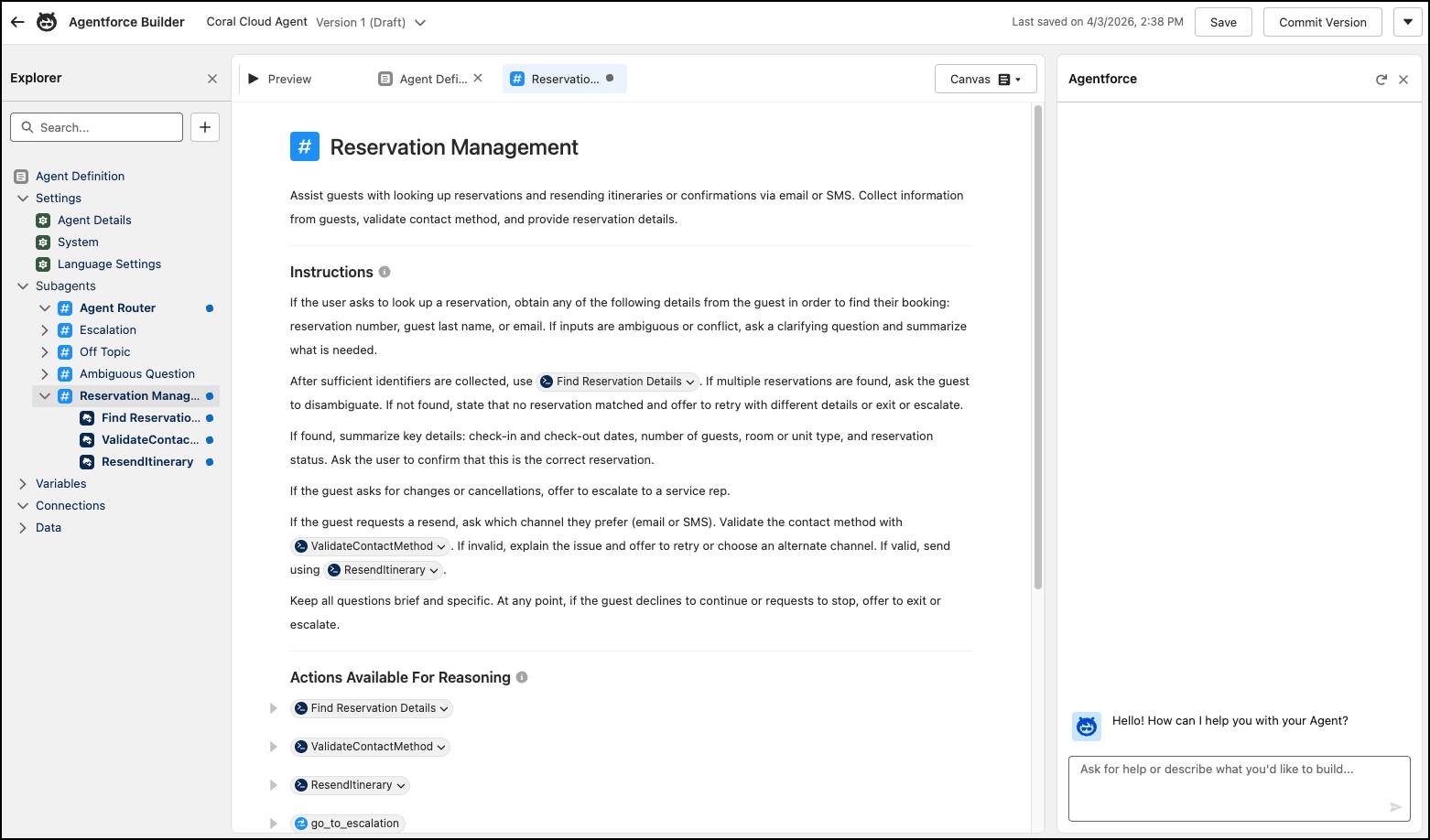
When Coral Cloud expands the agent’s capabilities in the second version of the subagent, the project team can update the description to include the additional jobs to be done: modifying and creating reservations.
Instructions
Instructions (sometimes called reasoning instructions) are the guidelines that tell your agent how to handle conversations in the context of the subagent.
Instructions contain a combination of programmatic logic (written in Agent Script) and natural language prompts. Programmatic logic strictly defines your agent’s workflow and business rules so that it can follow a defined, predictable path when needed. Natural language prompts more flexibly guide your agent’s conversational skills.
An example of a natural language instruction for Coral Cloud’s subagent might be: “Always confirm the details of a reservation modification with the guest before finalizing any changes.”
But there are times when Coral Cloud doesn't want to give an LLM the opportunity to misinterpret an instruction. For example, instead of adding the prompt “Don’t refund a booking unless it was canceled within 2 days of the check-in date,” Coral Cloud can write a programmatic expression in their instructions that assesses the criteria for issuing a refund.
As you prototype your agent, we suggest crafting the subagent instructions last. You can’t write effective instructions without knowing how much logic you built into the actions versus how much decision-making you’re asking the agent to complete on its own.
Time for Action
Now that Coral Cloud has fleshed out their Reservation Management subagent, they start thinking about the right custom actions to add to the subagent. Thankfully, Coral Cloud already defined its business processes related to hotel reservations in the previous unit, and many of those business processes will translate into custom actions. But how do they go about building those custom actions?
The good news about custom actions is that you don’t have to create them out of thin air. In fact, custom actions are based on Salesforce technologies you already know and love. When you create a custom action, you build it on top of existing platform functionality that you want to make available in Agentforce: invocable and REST Apex classes, autolaunched flows, prompt templates, external services, and MuleSoft APIs.
In Agentforce, we refer to that underlying functionality as a reference action, and it’s an awesome way to get more mileage out of your Salesforce Platform capabilities.
Design Considerations for Reference Actions
So what is Coral Cloud’s approach to the design of the underlying reference actions for its agent actions? Below are some factors the team considers.
Deterministic or Prompt-Based
When developing the underlying platform functionality for your agent actions, first review the business processes and tasks related to your use case. Then decide whether the process or task should be deterministic or prompt-based.
-
Deterministic: Uses an invocable or REST Apex class or an autolaunched flow to generate output. Actions based on flows or Apex are deterministic and use business logic and rules to produce a consistent outcome.
-
Prompt-based: Uses one or more prompt templates to generate output. A prompt-based action lets you control how a response is written or use reasoning and generative capabilities of an LLM. For example, to generate a summary or perform sentiment analysis, you need to use a prompt template as a reference action. Prompt templates are also used to ground an agent in data, such as knowledge or external system data.
Keep in mind that an action can combine both deterministic and prompt-based approaches. For example, say that when a guest cancels their reservation, a flow-based action is triggered to complete the cancellation. At some point during that flow, the agent could also follow a prompt to ask the customer for information about why they’re cancelling. The agent could even summarize the response from the customer and provide that summary for review if the customer indicates a particular reason for cancelling. Over time, Coral Cloud can use this combined approach to better understand and respond to the issues that impact customers. It could call a prompt template that sends a cancellation confirmation email with personalized offers to entice that particular customer to make a future booking.
Atomic or Composite
Another factor to consider is whether the reference action is atomic or composite.
-
Atomic: A small, singular task. A modular approach gives the agent freedom to combine actions in different ways to accomplish a more sophisticated goal. It also tends to provide more opportunities for action reuse across different subagents.
-
Composite: A complex task made up of multiple subtasks. The benefit of a composite action is that you control the exact sequence of steps the agent takes to complete a task.
Inputs and Outputs
In Agentforce, each agent action must have at least one input, which means the underlying flow, Apex, or prompt template must also have at least one input. For example, to look up a hotel reservation, the input might be the guest’s email or reservation number. During a conversation, the AI agent has the autonomy to gather information and decide if it has all the details required for it to trigger the action and pass in the input.
Each action must also have at least one output. The way you build the action determines what the output is, how it’s used, and whether and how it’s displayed to users in the conversation. Don’t be afraid to experiment with test actions that aren’t fully implemented, either—they can be a great way to see how your ideas work in execution.
Coral Cloud’s Reference Actions
After considering business processes and the different ways to design Apex, flows, and prompt templates, Coral Cloud’s project team proposed these reference actions for the Reservation Management subagent.
-
Get Reservation by Email: A flow that looks up an existing reservation using the guest’s email address.
-
Get Reservation by Number: A flow that looks up an existing reservation using the reservation number.
-
Send Reservation Confirmation: An Apex class that sends the guest a confirmation email with their reservation details.
-
Create or Update Reservation: A flow that creates a new reservation if one doesn’t exist; if the reservation exists, it updates the record.
-
Cancel Reservation: A flow that cancels an existing reservation. The flow calls a prompt template that sends a cancellation confirmation email with personalized offers to promote future bookings.
-
Initiate Refund: A flow that processes a refund for a reservation cancellation if certain conditions are met.
From Reference Actions to Agent Actions
Creating all the necessary flows, Apex, or prompt templates for your use case can take some time, but turning them into custom agent actions is a breeze!
When you create a custom action, the action label and API name are populated with the existing reference action’s name and API name. The instructions for the custom action and each input and output are also populated with the descriptions from the reference action.
The action instructions tell the AI agent what a specific action does and when to trigger it. Well-written instructions ensure that actions are used consistently and accurately. To learn more about optimizing action instructions, check out the best practices for action instructions.
Coral Cloud now has a set of actions for their use case, so the project team assigns them to a subagent. Now they’re ready to test the prototype and refine its building blocks.
Evaluate the Performance
After you configure a prototype in Agentforce, it’s important to test and see how the AI agent performs. You have two options for testing your AI agent.
- Manual testing in Agentforce Builder
- Batch testing in Testing Center
The Coral Cloud team tests their AI agent with questions and requests their users might make about hotel reservations. Then they answer these questions.
- Does the agent accurately interpret user input?
- Does it launch the right actions?
- Does it provide helpful, accurate responses?
- Does it execute business processes correctly and adhere to company policies and rules?
Based on the test results, the Coral Cloud team refines their subagent instructions and continues iterating on the AI agent. And remember: If you’re getting errors during the testing process, be sure to check the permissions for your AI agent.
The Finishing Touches
There are a few other items that the Coral Cloud team needs to cross off their to-do list as they refine their prototype.
- Customize the standard escalation subagent so that it can route conversations to live service reps when necessary.
- Build an authentication solution to verify users interacting with the AI agent.
-
Connect the AI agent to customer channels.
And when Nora and her team reach the point where the AI agent is performing reliably and accurately in Coral Cloud’s sandbox environment, they create their deployment plan for rolling out the AI agent to production. Then they monitor the agent, which helps them continuously improve and iterate on the agent’s design.
A Strong Foundation
Now you know that planning and designing an AI agent is all about laying down a strong foundation. You need to identify your use case and objectives, think about your data strategy, consider the user experience, and outline your project’s technical requirements. Address potential risks and define your business processes to make sure the AI agent aligns with your organization’s operational, security, legal, ethical, regulatory requirements.
Don’t make the mistake of taking a waterfall approach to agent design. That is to say, you don’t have to develop and deploy with a linear, phased plan. As you consider your Agentforce solution from all the necessary angles, get hands-on and begin prototyping the AI agent in your sandbox environment. That way, you don’t invest too much time up front on a plan that might not work out in the end. By combining thorough planning with continuous experimentation, you can roll out a trustworthy AI agent that unlocks transformative value for your organization.